How do I monitor a REST health endpoint?
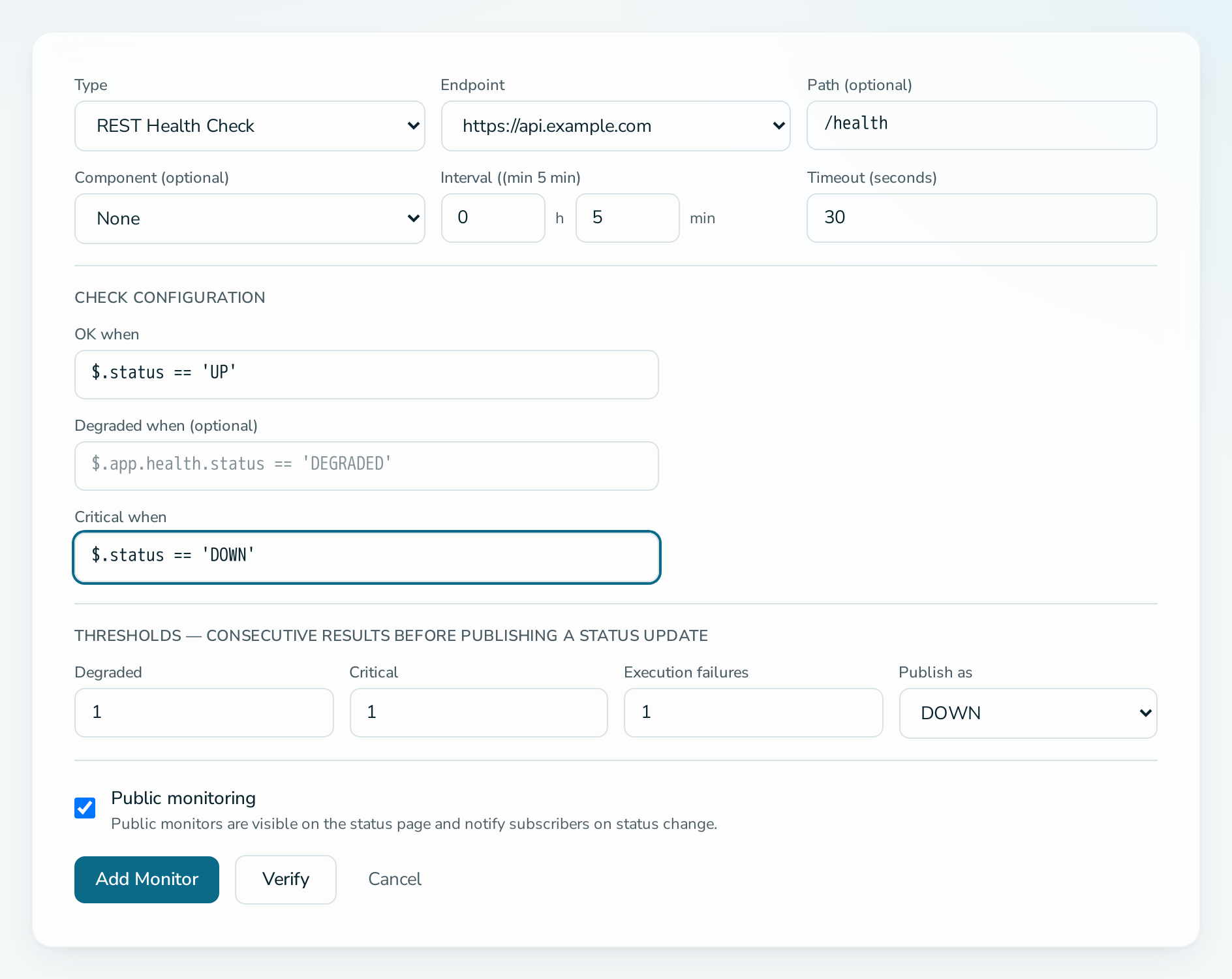
Add a monitor of type REST Health Check on a verified endpoint, enter the path of the health endpoint and describe the values for OK and Critical. A Representational State Transfer (REST) health endpoint returns a JavaScript Object Notation (JSON) document such as {"status": "UP"}. For that, use $.status == 'UP' for OK when.
Before you start
- You are an OPERATIONS or ADMIN member.
- The endpoint is verified. See how to verify an endpoint.
Steps
- Open the service, select Monitoring, then Add Monitoring.
- Choose REST Health Check as Type and pick the Endpoint.
- Enter the Path, for example
/health. - Under Check Configuration, set:
- OK when:
$.status == 'UP' - Critical when:
$.status == 'DOWN' - Degraded when: optional, for example
$.status == 'SLOW'
- OK when:
- Set the interval, timeout and thresholds. See thresholds and timing.
- Select Verify to run one test check.
- Select Add Monitor.
Questions
What if my endpoint returns no JSON?
Leave the expressions empty. Then any 2xx reply is Operational, and a reply that takes more than 80 percent of the timeout is Degraded. A 5xx reply is Critical.
What happens when no expression matches?
The check counts as an execution failure. See how to choose what happens when a target is unreachable.