How do I verify ownership of an endpoint?
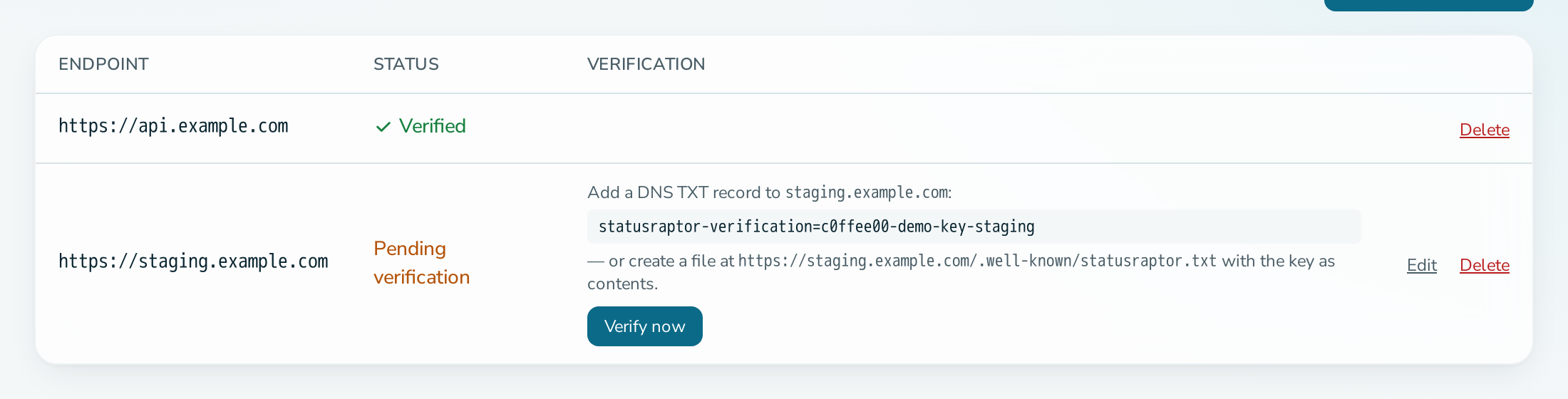
Add the endpoint, then either create a Domain Name System (DNS) TXT (text) record with the key, or serve a file at /.well-known/statusraptor.txt that contains the key. Then select Verify now.
Before you start
- You are an OPERATIONS or ADMIN member.
- You control the domain, either its DNS or the website on it.
Steps
- Open the service, select Endpoints, then add the endpoint: Protocol, Domain and an optional Port. Use a hostname, not an Internet Protocol (IP) address.
- Copy the verification key shown on the endpoint row.
- Choose one method:
- DNS: add a TXT record on the domain with the value
statusraptor-verification=<key>. - File: serve
<protocol>://<domain>/.well-known/statusraptor.txtwith the key as its content.
- DNS: add a TXT record on the domain with the value
- Select Verify now.
Questions
Verification fails. What should I check?
For DNS, wait for propagation and check the record with dig TXT <domain>. For the file, open the Uniform Resource Locator (URL) in a browser and confirm that it answers 200 directly, because redirects are not followed.
Can I change an endpoint after verification?
No. Verified endpoints are locked. Delete it and add a new one. Deleting an endpoint also deletes its monitors.
I forgot to verify. Will I be reminded?
Yes. A daily email at 09:00 lists endpoints that are still unverified.