Status Raptor Status Raptor
EnglishEspañolDeutschFrançaisDanskSvenskaNorskItalianoSuomiNederlands
Documentation Sign in

Features

  • Status updates
  • Incidents
  • Visibility modes
  • Custom domains
  • Services
  • Components
  • Public status page
  • Search engine indexing
  • RSS feed
  • Languages
  • Monitoring
  • Endpoints
  • Monitor types
  • Thresholds and timing
  • Email subscribers
  • Team and roles
  • REST API
  • Plans and limits
  • Accounts and sign-in
  • Security and rate limiting
  • Email notifications

How-to guides

Getting started

  • How do I create an account?
  • How do I sign in with Google or GitHub?
  • How do I create my first service?
  • How do I add components to a service?
  • How do I view my public status page?
  • How do I reset a forgotten password?
  • How do I change my password?

Publishing status

  • How do I publish a status update?
  • How do I publish an update for one component?
  • How do I format a status update with Markdown?
  • How do I edit or delete a status update?
  • How do I open an incident?
  • How do I post updates to an incident?
  • How do I close an incident?
  • How do I announce planned maintenance?

Visibility and domains

  • How do I put my status page behind a password?
  • How do I change or remove the password of my status page?
  • How do I share my status page with a secret link?
  • How do I use my own domain for the status page?
  • How do I fix a custom domain that will not verify?
  • How do I control whether search engines index my status page?

Monitoring

  • How do I verify ownership of an endpoint?
  • How do I monitor a REST health endpoint?
  • How do I check that a page contains specific text?
  • How do I monitor only the HTTP status code?
  • How do I monitor a page that is built with JavaScript?
  • How do I test a monitor before saving it?
  • How do I attach a monitor to a component?
  • How do I set how often a monitor runs?
  • How do I avoid false alarms and choose what happens when a target is unreachable?
  • How do I make a monitor public or private?
  • How do I read the monitoring history?
  • How do I delete a monitor or an endpoint?

Subscribers

  • How do visitors subscribe to my status page?
  • How do I unsubscribe from a status page?

Team

  • How do I invite a team member?
  • How do I accept or decline an invitation?
  • How do I choose or change a team member's role?
  • How do I remove a team member?

API and automation

  • How do I create or revoke an API key?
  • How do I post a status update from a script?
  • How do I open and close an incident from a script or a deployment pipeline?

Plans and account

  • How do I request an upgrade to PRO?
  • What are the limits of FREE and PRO?
  • How do I delete a service or a component?
    Documentation / How-to guides

    How do I open an incident?

    Open the service, select Incidents, then Open Incident. Enter a title, choose a status, write the first message and submit. Subscribers receive an "incident opened" email.

    Before you start

    • You are a member of the service with any role.

    Steps

    1. Open the service. On Overview, select Create Incident, or use the Incidents tab.
    2. Enter a short title, up to 256 characters.
    3. Choose a Status. Operational is not offered when opening an incident.
    4. Optionally choose a Component.
    5. Write the Message and select Open Incident.
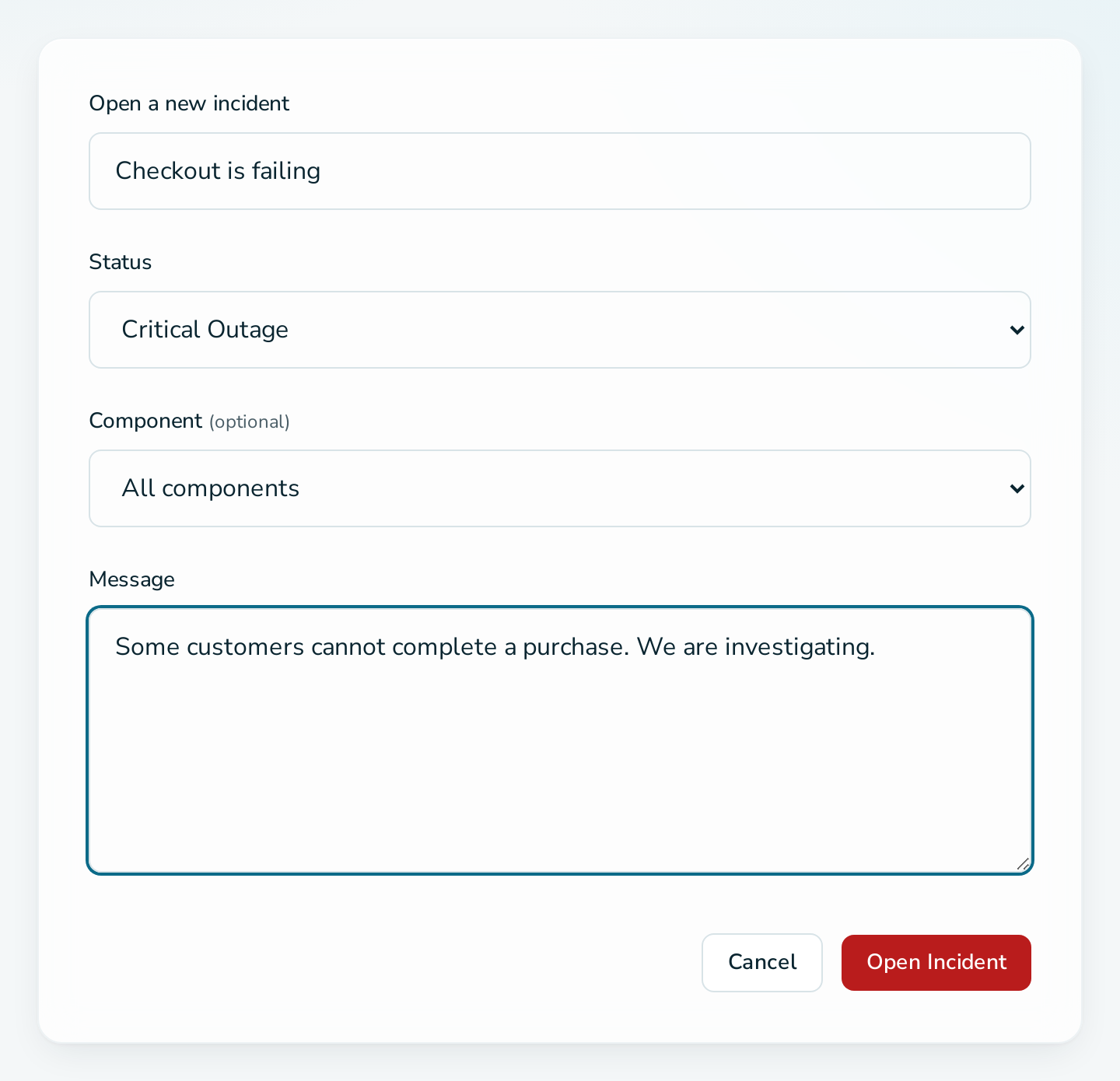
    Open a new incident form

    Questions

    Can I open an incident without a message?

    No. An incident is created together with its first update.

    Where do visitors see it?

    Under Active Incidents on the status page, until you close it.

    Related

    • Incidents
    • How do I post updates to an incident?
    • How do I close an incident?

    Status Raptor
    Status Raptor by Input Objects GmbH
    Good Stuff Platform status Documentation Friendly Policy
    Legal Stuff Terms & Conditions Privacy Policy Cookie Policy Imprint
    How do I publish a status update?How do I post updates to an incident?How do visitors subscribe to my status page?How do I announce planned maintenance?How do I control whether search engines index my status page?
    How do I share my status page with a secret link?How do I post a status update from a script?How do I put my status page behind a password?How do I make a monitor public or private?How do I monitor a page that is built with JavaScript?
    v1.4.1 · © 2026 Input Objects GmbH